Write an Adaptive Card
Understand how to create and add an Adaptive Card to OneBot
Written By Ben Lehmann
Last updated About 1 year ago
Overview
This article covers how to write a new card definition for an Adaptive Card. It also suggests some further resources supporting creating card definitions. For information on how to add, edit and use card definitions, see the article Using Adaptive Cards.
What is a card definition?
Definitions give cards their content and behaviour: cards need a definition before they can be useful. Card definitions are written in JSON and set out which elements should be used by your card, and where to place them. Definitions also provide data bindings that enable OneBot to exchange information with the card and respond to user actions.
A simple card example, followed by its definition written in JSON
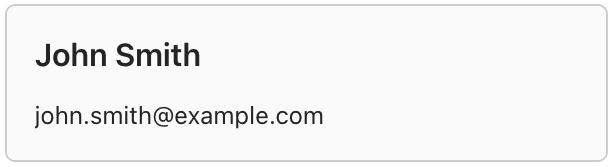
{
    "type": "AdaptiveCard",
    "$schema": "https://adaptivecards.io/schemas/adaptive-card.json",
    "version": "1.5",
    "body": [
        {
            "type": "TextBlock",
            "text": "John Smith",
            "style": "heading"
        },
        {
            "type": "TextBlock",
            "text": "john.smith@example.com"
        }
    ]
}
One you have written a definition for your card, you capture the JSON string defining it and add it to the Content Hub as a new Card Definition.
The Card Designer
The Card Designer provided by Microsoft is a helpful tool that supports writing card definitions.
The article Introduction to the Adaptive Card Designer article provides information on how to get started using their designer to compose and create card definitions.
We also have a walkthrough for Creating a Basic Adaptive Card using the Card Designer
Further Resources
A discussion covering all aspects of designing card definitions is a significant topic: Microsoft’s Adaptive Card Hub has many resources that cover the extensive scope of writing card definitions.
Was this helpful?
Still need help? Share an idea