Adaptive card displays error when trying to display text data from a business object
Description:
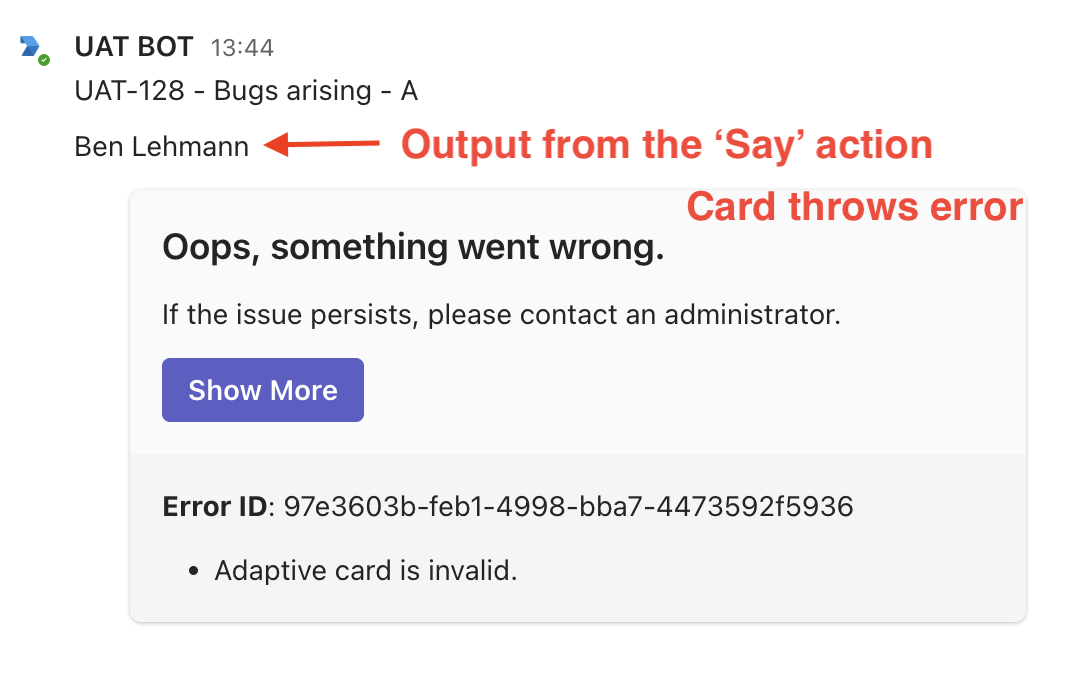
When using an adaptive card to display data from an Ivanti Neurons business object, the card triggers the ‘Adaptive card is invalid’ error message when passing text from a valid field on a valid business object.
Desired behaviour:
The passed text data should render on the card
Actual behaviour:
The error message: ‘Adaptive card is invalid’ is displayed instead of the valid text data taken from the business object
Approach taken to repro:
The approach below does the following things to demonstrate the error:
Gets a business object
Prints text data from the object to chat to demonstrate that the data is valid
Attempts to render an Adaptive Card containing the same data to chat, which fails.
Steps to repro:
First, create an Adaptive Card to attempt to display the data. Here is the card definition I used:
——————————————
{
"type": "AdaptiveCard",
"body": [
{
"type": "TextBlock",
"size": "Default",
"text": "${valueToTest}",
"wrap": true
}
],
"$schema": "http://adaptivecards.io/schemas/adaptive-card.json",
"version": "1.3"
}
——————————————
Create a workflow
Add an Ivanti Neurons ‘Get Business Object’ action, and config with:
Neurons for ISM System = Demo instance
Business Object = Employee
Search = ben.lehmann@sollertis.co
Filter, sort by, & first record = [leave these blank]
Number of records = 1
Add a ’Say’ action, and config with:
In ‘Message to send’, set it up with:
Type ‘/‘ to access quick entry
Select ‘Other’
Choose ‘JSON path’ from the dropdown
In ‘Object’, type ‘/‘ and select ‘GetBusinessObject’ and then ‘Results’ [assuming you didn’t change the name of the GetBusObj action]
In ‘JSON Path’ type ‘$[0].DisplayName
Add a Teams ‘Show Card’ action, and config with:
Card Template = [whatever title you gave your adaptive card in step 1]
In ‘valueToTest’ [assuming you use the same card as I did], set it up with:
Type ‘/‘ to access quick entry
Select ‘Other’
Choose ‘JSON path’ from the dropdown
In ‘Object’, type ‘/‘ and select ‘GetBusinessObject’ and then ‘Results’ [assuming you didn’t change the name of the GetBusObj action]
In ‘JSON Path’ type ‘$[0].DisplayName
Run the workflow. You’ll see that the ‘Say’ action does display the text data correctly [i.e. ‘Ben Lehmann’ is printed into the chat stream], but that the card does not, and instead the card throws the ‘Adaptive card is invalid’ error.
Log in to comment and vote
No comments yet
Be the first to share your thoughts.