Generate OTP
Reference documentation for using the Generate OTP action
Written By Support Channel
Last updated Over 1 year ago
Overview of the Generate OTP action
The Generate OTP action creates a temporary one-time password (OTP) based on your chosen settings, such as the length or format of the code. This password is then stored in a variable, which can be used later in the chatbot to send to the user or verify their identity.
Understand the Generate OTP action
The Generate OTP action allows you to customise how the resulting password will be created. The following customisation options are available:
Length
Specify the number of characters the OTP should contain.
Include
Choose the type of characters to include in the OTP:
Numbers only
Letters only
Numbers and letters
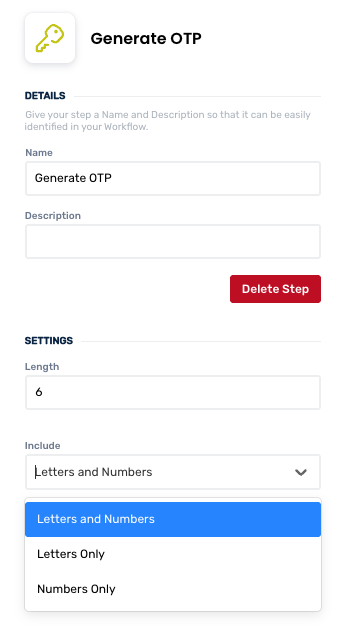
Create and manage Generate OTP actions
Add a Generate OTP action
Add the action
Use the following steps to add the action to a workflow.
How to add an action to a workflow
How to add an action to a workflow
Click the ‘plus’ symbol on the workflow path at the point you want to insert the action. This opens the action menu slide-over.
Either:
Search for the action using the Search field above the actions in the menu.
Locate a Recently Used action in the top section of the menu.
Navigate to the action within menu: Core actions are listed under Actions, while Plugin actions are contained within their associated integration.
Select the desired action to insert it. This reveals the action’s configuration panel.
Use the Name field to name the action. This can help users to understand your workflow at a glance. (optional)
Use the Description field to add information describing the action. This can help users wanting to understand how your workflow functions (optional).
Configure the action
Use the following steps to configure the action.
Select Length and Include settings
Click back in the main view to hide the slide-over.
Delete a Generate OTP action
Use the following steps to remove the action from your workflow:
How to remove an action from a workflow
How to remove an action from a workflow
Access the workflow in draft mode to edit it.
Either:
hover your mouse cursor over the action, and then click the red cross that appears over the top-right corner of the action to delete it. Or:
click on the action to open the action slide-over. Click the red 'Delete Step’ button to remove the action from your workflow.
Click Publish in the top-right to commit your changes.
Take care when deleting an action to also remove any logic using its outputs: workflow steps may function incorrectly or break if they attempt to evaluate an output of a deleted action.
Use the Generate OTP action
After using the Generate OTP action, you will be able to use / to call on and utilise the output value under the Generate OTP category.
Was this helpful?
Still need help? Share an idea